· 5 min read
AI Workout App Trial Checklist: Five Things to Test Before You Subscribe

Colin Raney
Co-founder & CEO of Ray, NASM-CPT · Evidence reviewed September 6, 2026
Firsthand comparison notes: May 2026.
Quick answer: During an AI workout app trial, check whether you understand the next exercise, can adjust time or equipment, can track your session, can return easily, and understand the subscription terms. Use a realistic workout to test those five things. If you want spoken guidance and less planning, try the checklist with Ray.
A feature list can help you choose what to try. Your first session can show you where the experience works for you and where you still need help.
Disclosure: I co-founded Ray, which publishes this guide. The Ray examples below use its current product descriptions. You can apply the same questions to whichever apps you are considering.
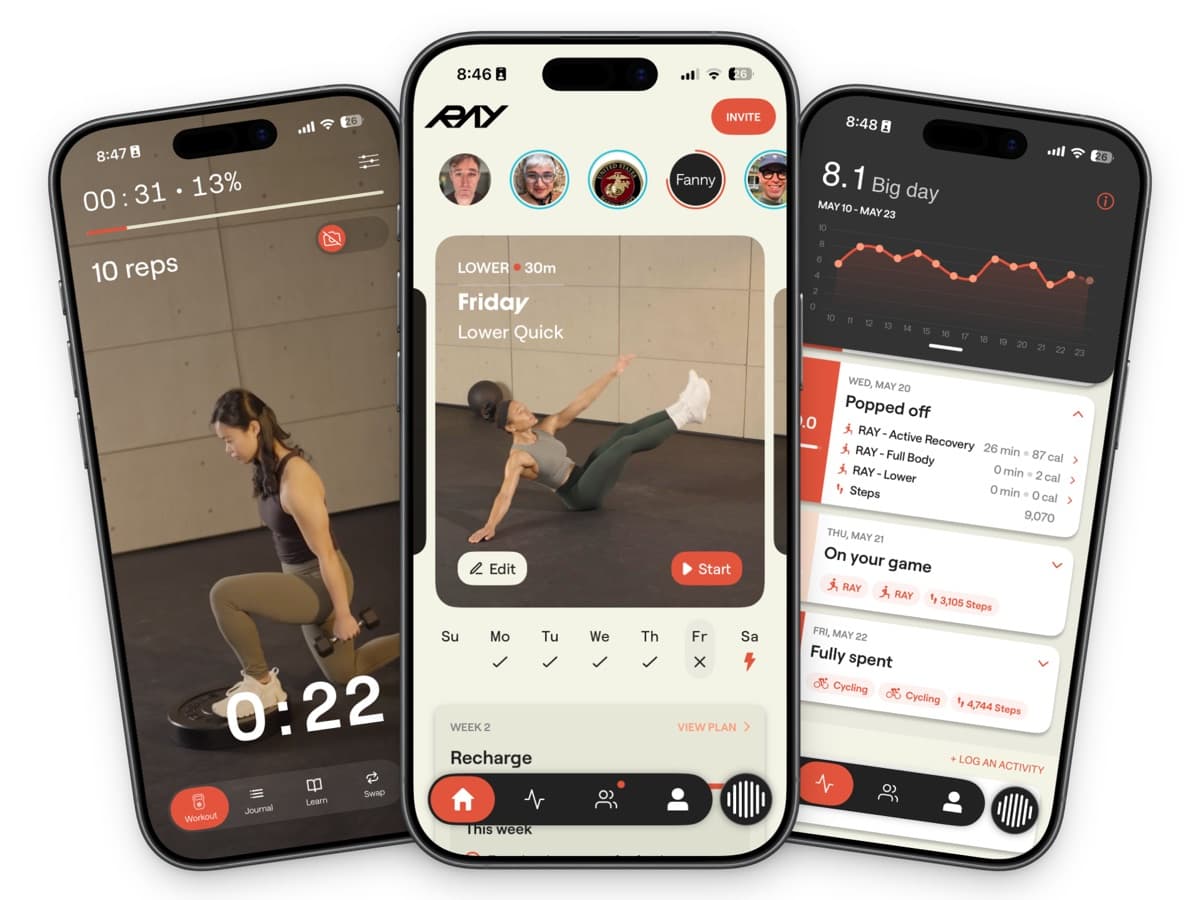
Check the workout itself, the plan you return to, and the history the app keeps. These are examples from Ray.
Start with the situation you actually need help with
Before opening the app, finish this sentence: “I want help with ___.” Be specific. Maybe you need a plan you can follow at home, instructions during each exercise, or a way to adjust when a meeting cuts into your workout.
Choose one realistic session with your usual equipment. Avoid judging an app only on a day when you have unlimited time and access to everything. You are choosing something for your ordinary week.
1. Can you understand what to do next?
Look at the first exercise and its instructions. Can you find the demonstration, understand the planned work, and move to the next part of the session without guessing?
If you want spoken instructions, try them with the headphones and audio you normally use. If you prefer reading a plan and working independently, check whether the screen makes that easy. Neither preference needs to win a feature comparison; it needs to work for you.
Try it with Ray: Ray offers audio guidance alongside your own music or podcasts, and lets you request more or less guidance. Start with a familiar exercise and check whether the amount of instruction suits you. See how Ray’s audio guidance works.
Write down: the first moment you needed help, and whether you found it.
2. Can you change the time or equipment?
Give the app one constraint you genuinely face: a shorter session, a different location, or an unavailable piece of equipment. Check the resulting workout rather than relying on a confirmation message. Did the plan actually change in the way you requested?
Try it with Ray: Ray’s FAQ describes adjustable workout duration and equipment settings for home, gym, and travel. Set up the time and equipment you actually have, then check the resulting session. Test the constraint that matters to you instead of assuming every possible adjustment works identically.
Write down: what you changed and what the app changed in response.
3. Does the tracking fit your workout?
Try recording a completed set and correcting an entry. Then check the saved session. Do the details you care about appear clearly, and can you understand how to use them next time?
Try it with Ray: Ray’s optional camera-based rep counting is available for supported exercises. If you want to use it, test a supported movement with the required camera setup and check the recorded result. The App Store description explains the feature; don’t assume it covers every movement.
Write down: what was recorded automatically, what you entered, and anything you had to correct.
4. Is returning for the next session straightforward?
After the workout, find your history and the next planned session. Check the controls you would use if your schedule changed. If reminders matter to you, look at their settings and decide whether they would be helpful.
You cannot establish long-term consistency in a single trial workout. You can identify whether the next step is clear and whether the app supports the way you organize your week.
Try it with Ray: Ray lets you change your workout schedule, and its FAQ describes adjusting the program after missed weeks. Find the schedule controls during your trial so you know how to use them when plans change.
Write down: how you would move or restart your next workout.
5. Are the subscription terms clear?
Before subscribing, check the trial end date, renewal amount, billing period, and cancellation route shown for your account. Compare the offer at checkout with the product’s current pricing information. For Ray, start with the pricing section of the FAQ.
Leave a question unresolved if you cannot verify it. A discount does not settle whether the workout experience fits you.
Keep a small decision record
What matters to me | What happened in my trial | Fits / needs another check |
|---|---|---|
Understanding the next exercise | ||
Adjusting time or equipment | ||
Tracking the session | ||
Returning after a schedule change | ||
Subscription terms |
On a small screen, swipe the table sideways to see all columns. Copy it into your notes to record your answers.
Use specific observations rather than a total score that treats every feature as equally valuable. One unresolved requirement may matter more than several features you will never use.
For a shortlist, see our AI personal trainer app comparison. If spoken workout guidance is your priority, see the voice-guided workout app guide. Bring this checklist to whichever app you try, including Ray, and judge the session you actually experience.
Put the checklist to work with Ray
Want spoken guidance during a workout and fewer decisions before it? Try Ray free for seven days and use this checklist during your first session. Start with your real schedule and equipment, then judge how well the experience fits.
Check the current trial and subscription terms before starting.
Why I focus on these questions
My comparison notes from May 2026 focused on the decisions each app leaves to the person exercising. In Fitbod, I noted choices around workout duration, equipment or location, and workout focus. In Apple Fitness+, I noted the need to browse classes and choose a session. Those observations inform this checklist: start with the decisions you want help making, then check the experience yourself.
This guide combines those dated observations with AI-assisted research of the official Ray sources linked above. The five checks are a practical decision framework, not a validated assessment or a new hands-on test of every current app version. They help you evaluate the app experience; they do not establish workout safety or long-term fitness results. If you need injury rehabilitation or advice specific to a medical condition, consult an appropriately qualified clinician.