Best Peloton Alternatives 2026: What We Actually Switched To
Direct answer: the best Peloton alternative in 2026 depends on why Peloton stopped working for you. Choose Ray if you want an adaptive workout plan instead of another class library; Apple Fitness+ if you want polished video classes for less; Fitbod if your next goal is strength; Future if you want a human coach; Ladder if you want structured strength teams. If Peloton still gets you on the bike, keep it. The best Peloton alternative is the app that matches how you actually train now.
Disclosure: Ray publishes this guide and is evaluated against the same criteria as the alternatives. Ray is our product, so here is the fair answer upfront: choose Ray if Peloton’s classes have started to feel repetitive and you want workouts that change around your time, equipment, energy, travel, soreness, and goals. Choose Peloton if you still love cycling, the leaderboard, familiar instructors, and the at-home bike or tread experience.
Try Ray free for 1 week if you want a workout plan that changes with your real life instead of another video class to follow.
Why people are looking beyond Peloton
Peloton solved a real problem: it made home workouts feel energetic, social, and easy to start. If you owned the bike or tread, you could open the screen, choose an instructor, and be moving in minutes.
That is still valuable. The issue is that many people eventually want more than the Peloton class model: cardio, lifting, stretching, and more whole-body athletic training without always being at home in front of Peloton hardware.
That is the real search intent behind “best Peloton alternatives.” It is usually not “find a cheaper spin class.” It is closer to: “I want the motivation Peloton gave me, but I need an app that fits my life better now.”

Methodology: the real-world scenario test we used
Last reviewed May 25, 2026. For this review, members of our team worked through three practical Peloton-switcher scenarios instead of only comparing feature lists: a 6:30 p.m. dinner-prep window where you are trying to squeeze in a workout, a busy morning where you have very little time for fitness, and a travel day where your usual equipment suddenly is not available.
In each scenario, we asked two questions: how would Peloton perform, and what would a different solution need to do better? Peloton still performs well when you want instructor energy, cycling or tread structure, and a familiar class environment. Other options performed better when the job was adapting the plan around time, equipment, travel, soreness, or the need to avoid class browsing.
| Scenario we tested | How Peloton tends to perform | What a strong alternative needs to do |
|---|---|---|
| 6:30 p.m., dinner needs to get started, and you are trying to squeeze in a workout | Good if the right class is obvious and your bike, tread, or mat setup is ready; weaker if choosing a class becomes another decision. | Shorten the session, preserve the training goal, and remove browsing so the workout can start quickly. |
| Busy morning with a long to-do list and not much time for fitness | Good for a quick follow-along class; less helpful if you need the plan to decide what matters most today. | Give a focused workout that matches available time, recent training, and the rest of the week. |
| Travel day with none of the equipment you normally use | Useful for bodyweight or stretching classes, but the broader plan may not adapt around missing equipment. | Swap movements, adjust difficulty, and keep the routine intact without requiring your normal setup. |
How we compared these Peloton alternatives
We compared each option on the three scenarios above plus five practical questions:
| Question | Why it matters |
|---|---|
| What type of training does it do best? | Peloton is strongest for classes and cardio; many switchers want broader strength, mobility, or hybrid training. |
| Does it adapt to the user? | A class library gives options, but a coaching system should help decide what to do today. |
| Does it require special equipment? | A true Peloton alternative should work beyond one bike or tread unless hardware is the point. |
| What does the public pricing page say? | Pricing changes often, so this article cites official pages checked on 2026-05-25 and keeps conservative wording where public pricing was not clear. |
| Who should not choose it? | Comparison articles are only useful if they name the tradeoffs, not just the positives. |
Quick comparison: Peloton alternatives in 2026
| App | Best for | Coaching style | Equipment dependency | Public pricing note checked 2026-05-25 |
|---|---|---|---|---|
| Ray | Adaptive whole-body coaching | AI voice coaching, workout planning, feedback-based adaptation | iPhone; no Peloton hardware required | Ray site says plans start at $19.99/month after a 7-day free trial. |
| Peloton | Cycling/tread classes and instructor-led motivation | Video classes, leaderboard, instructor personality | Best with Peloton Bike, Tread, Row, or compatible setup | Peloton pages should be rechecked immediately before publish because membership/app pricing is dynamic and may vary by plan. |
| Apple Fitness+ | Polished video workouts for Apple users | Instructor-led video classes and Apple ecosystem integration | iPhone required; Apple Watch enhances experience | Apple lists $9.99/month or $79.99/year after trial. |
| Fitbod | Strength training plans for gym or home lifters | Algorithmic strength programming and recovery-based recommendations | Works with gym, home equipment, or bodyweight settings | Fitbod’s public marketing page emphasizes personalized strength training; check the App Store or in-app paywall for the current price before purchase. |
| Future | Premium human accountability | Dedicated human coach, text support, custom plan | iPhone/Apple Watch-centered experience | Future’s public page checked on 2026-05-25 said $50 for the first month, then $199/month. |
| Ladder | Strength programs with coach/team structure | Weekly strength programming, in-ear coaching, team/community feel | Gym or home, depending on plan | Ladder’s public page confirms a 7-day free trial without a credit card; check the app store or paywall for current recurring pricing before purchase. |
1. Ray — best if Peloton got boring and you want adaptive coaching
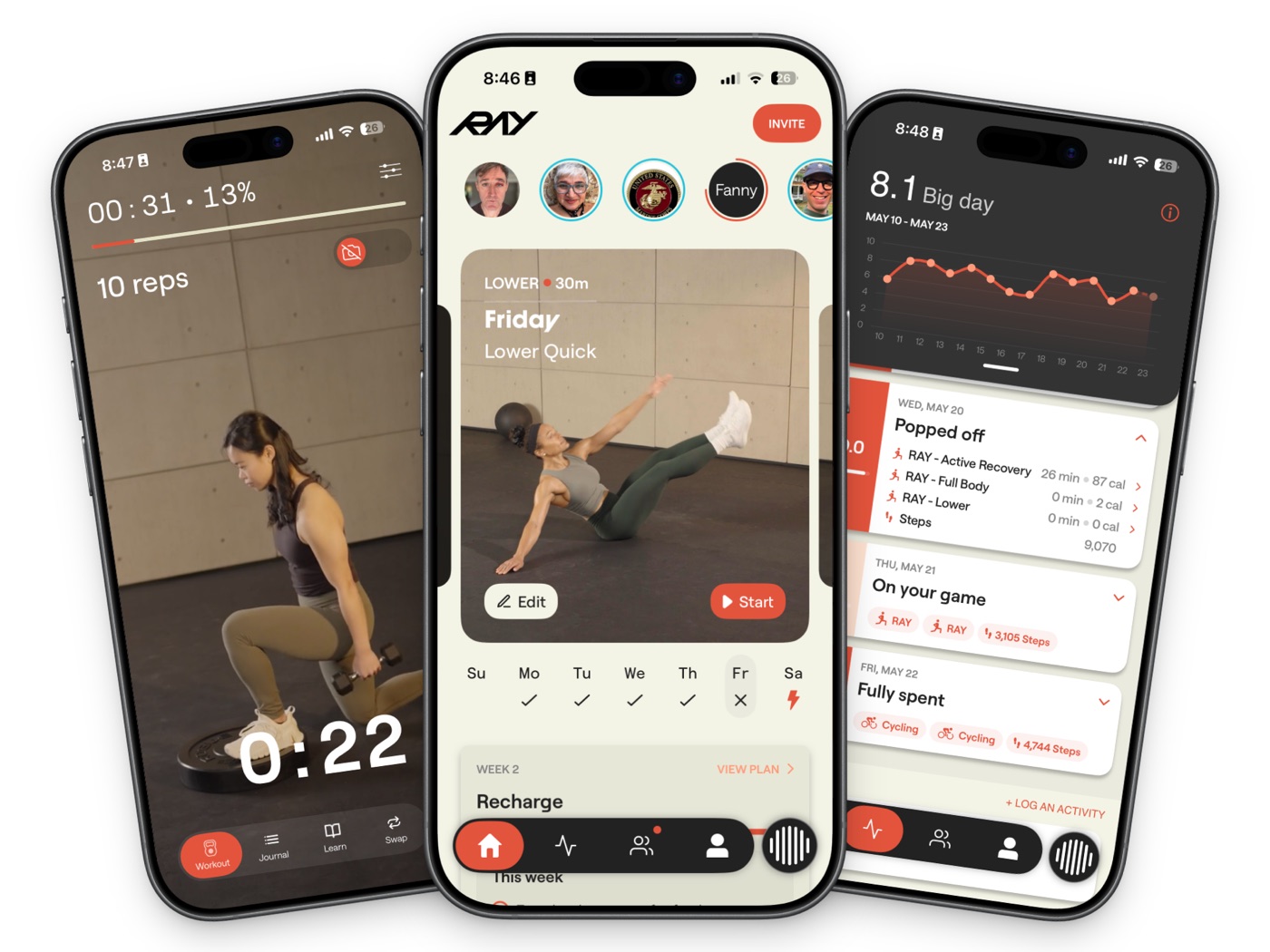
Ray is the best Peloton alternative for someone who liked Peloton’s motivation but no longer wants every workout to depend on a bike, tread, class schedule, or screen.
Ray is our product, so the comparison should be clear rather than coy. Peloton gives you a class. Ray gives you a simpler starting point: tell it what you want to do, what equipment you have, how much time you have, how your body feels, and what changed today. You do not have to want a long conversation with an AI coach. The useful part is that the plan changes before you lose ten minutes browsing. For a broader category view, see our guide to the best AI personal trainer apps, and for the mechanics behind adaptive coaching, read how AI fitness coaches adapt to real life. Ray then builds and adjusts the workout around that context.
That matters most when your life is inconsistent. Maybe you have 25 minutes between meetings. Maybe you are traveling. Maybe your knee feels off. Maybe you wanted strength today but your energy is lower than expected. Peloton’s best classes are still fixed classes. Ray’s advantage is that it can adapt the plan around the person using it.
Use Ray if:
- You want whole-body training: strength, cardio, mobility, or mixed sessions.
- You are tired of choosing from a large class library every day.
- You want workouts that can respond to your equipment, time, soreness, preferences, and energy.
- You want an alternative to expensive human coaching without losing guidance.
- You prefer voice-guided training over keeping your eyes on a screen.
Do not use Ray if:
- You mainly want Peloton-style cycling classes with a leaderboard.
- You need hands-on in-person form correction for complex barbell or Olympic lifts.
- You are not on iOS.
Price/platform note: Ray’s public site says plans start at $19.99/month after a 7-day free trial, with discounts for longer plans. If your main blocker is sticking with the plan after missed days, our guide to workout consistency myths explains the adherence problem in more detail. Try Ray free for 1 week.
2. Apple Fitness+ — best low-cost class alternative for Apple users
Apple Fitness+ is the cleanest alternative if what you liked about Peloton was the studio-class experience but not the Peloton hardware or subscription cost.
The strengths are obvious: high production quality, a broad workout library, strong Apple Watch integration, and a simple monthly price. Apple’s public Fitness+ page says new subscribers get 1 month free, then pay $9.99/month or $79.99 annually, with some device-purchase promotions offering longer trials. Apple One Premier also includes Fitness+.
Use Apple Fitness+ if:
- You already live in the Apple ecosystem.
- You want polished classes for strength, HIIT, yoga, cycling, dance, kickboxing, meditation, and more.
- You like seeing Apple Watch metrics during workouts.
- Your main Peloton complaint is price.
Do not use Apple Fitness+ if:
- You want the app to decide and adjust your training plan for you.
- You need coaching that responds mid-workout.
- You are switching from Peloton because you are tired of follow-along video classes.
Apple Fitness+ is not trying to be a personal trainer. It is a very good class library. That is enough for some people and not enough for others.
3. Fitbod — best for strength planning if you still want to lift on your own
Fitbod belongs in this article because many Peloton users are not just looking for another cardio class. They want to get stronger.
Fitbod’s public positioning is simple: it creates personalized strength workouts that update with your goals, available equipment, training history, and recovery. That makes it a strong option for people who already like lifting but do not want to plan every set, rep, and muscle group manually.
Use Fitbod if:
- You want strength-focused programming.
- You train at a gym, at home, or with a mix of equipment.
- You like logging sets and seeing progression.
- You want guidance, but you do not need to talk through changes during the workout.
Do not use Fitbod if:
- You want Peloton-like classes or instructor energy.
- You want voice coaching during the session.
- You need broader habit/accountability support beyond the workout plan.
Fitbod is closer to a smart strength planner than a Peloton replacement. That is a good thing if your main goal is progressive lifting, but it will not recreate the class atmosphere or community feel.
4. Future — best if you want a real human coach and can pay for it
Future is the premium option in this comparison. It is not a cheaper Peloton. It is closer to remote personal training.
Future’s public page checked on 2026-05-25 said $50 for the first month, then $199/month, with a 30-day refund window. That price is a different category from Apple Fitness+, Ray, Fitbod, or Ladder, but it buys something those apps do not: a dedicated human coach relationship.
Use Future if:
- Human accountability is the thing that makes you train.
- You want a coach to design and adjust your plan.
- You like text check-ins and ongoing human support.
- The monthly price is comfortable for you.
Do not use Future if:
- You want the most affordable Peloton alternative.
- You want real-time voice coaching inside the workout itself.
- You mostly need a flexible plan and nudges, not a premium coaching relationship.
Future is a strong choice for people who want a real trainer relationship. If that is the comparison you are really making, read our Ray vs. Future personal training comparison. For people who want lower-cost support that adapts around real life, Ray is the more accessible route.
5. Ladder — best for structured strength teams and weekly programming
Ladder is a good Peloton alternative for people who want the structure and energy of a program, but in a strength-training format rather than cycling or treadmill classes.
Ladder’s public site emphasizes daily workout plans, expert coaches, weekly programming, in-ear coaching, video demonstrations, pacing, and team/community structure. It also confirms a 7-day free trial with no credit card required.
Use Ladder if:
- You want a clear strength plan every day.
- You like the idea of joining a coach-led training team.
- You want more structure than a class library.
- You do not need the app to adjust around what is happening today.
Do not use Ladder if:
- You want Peloton-style cardio classes and leaderboard energy.
- You want the plan to change around your daily context.
- You need a fully personalized plan rather than team-based programming.
What about keeping Peloton?
Peloton is still worth it if the bike, tread, instructors, leaderboard, and familiar class ritual keep you consistent. There is no reason to abandon something that works.
Keep Peloton if:
- You love cycling or treadmill classes.
- The instructors are a major part of your motivation.
- You use Peloton hardware several times per week.
- The leaderboard and social energy help you push harder.
Consider switching or adding another app if:
- You are bored with the bike or tread.
- You want more strength training and mobility.
- You want workouts that adapt to travel, equipment, injuries, and time.
- You spend too much time browsing classes instead of training.
- You want coaching, not just content.
The best outcome may not be “delete Peloton.” For many people, it is “use Peloton for what Peloton does best, and use something like Ray when you need whole-body coaching that fits the day you are actually having.” If you are comparing options for midlife strength and consistency, Ray’s guide to fitness apps for women over 40 is a useful adjacent read.
Best Peloton alternative by person
| If this sounds like you | Choose |
|---|---|
| “I’m bored with the bike and want whole-body coaching that changes with me.” | Ray |
| “I want polished classes for less money and already use Apple devices.” | Apple Fitness+ |
| “I mostly want better strength workouts at the gym.” | Fitbod |
| “I need a real human coach checking in on me.” | Future |
| “I want structured strength programming and a team vibe.” | Ladder |
| “I still love the bike, instructors, and leaderboard.” | Peloton |
FAQ
What is the best Peloton alternative overall?
The best Peloton alternative overall depends on why you are leaving. Ray is the best choice if you want adaptive whole-body coaching instead of fixed classes. Apple Fitness+ is the best low-cost class alternative. Future is best if you want a dedicated human coach. Fitbod and Ladder are strongest for strength-focused users.
What is the cheapest Peloton alternative?
Apple Fitness+ is one of the clearest low-cost options among major Peloton alternatives, with Apple listing $9.99/month or $79.99/year after the trial on its public Fitness+ page. Some other apps may have lower annual or promotional pricing, so verify current pricing before choosing.
Is Ray better than Peloton?
Ray is better than Peloton if your problem is not motivation from instructors, but needing workouts that adapt to your real life. Ray can plan around your time, equipment, goals, injuries, travel, and energy. Peloton is better if you specifically want cycling or treadmill classes, a leaderboard, and familiar instructors.
Can I use Peloton alternatives without buying equipment?
Yes. Ray, Apple Fitness+, Fitbod, Future, and Ladder can all be used without Peloton hardware. Some apps work better with equipment, but none require a Peloton bike or tread.
Should I replace Peloton or add another app?
If Peloton still makes you train, you may not need to replace it. Add another app if Peloton covers cardio but not strength, mobility, travel workouts, or adaptive coaching. Replace Peloton if you are paying for a membership you no longer use consistently.
Source links used
- Peloton membership/app pages: membership and app
- Apple Fitness+: https://www.apple.com/apple-fitness-plus/
- Apple One: https://www.apple.com/apple-one/
- Fitbod: https://fitbod.me/
- Future: https://www.future.co/
- Ladder: https://joinladder.com/
- Ray: https://www.rayfit.com/
- Ray App Store listing: https://apps.apple.com/us/app/ray-ai-personal-trainer/id6474633735